> ## Documentation Index
> Fetch the complete documentation index at: https://docs.omnilinker.pl/llms.txt
> Use this file to discover all available pages before exploring further.
# Overview, price map and gaps
> Read how well resellers hold your recommended prices, see where the prices sit, and work through the list of gaps.
The manufacturer dashboard shows how well resellers hold your recommended retail price (RRP) across the offers
Omnilinker observes. Open **Pricing Intelligence** > **Manufacturer Dashboard**. If the page shows a setup card
instead of figures, complete the [setup checklist](/pricing-intelligence/manufacturer-dashboard/setup-checklist)
first.
Screenshots show example data: shop and product names are placeholders.
## Key terms
These definitions are the ones every figure on the page uses.
* **Reference price (RRP)**: The price of the product on the price level its market is compared against: the market's
**Compared against** level, or, when that is empty, the catalog price level marked as the recommended retail price.
The page calls it "RRP", or quotes the level's name when it shows it.
* **Fresh offer**: An active offer of a product you track, matched in a market in view, whose page was scraped within
the freshness window. Prices older than the window (7 days by default) are left out of every figure. The window is
the **Competitor freshness window (days)** setting, shared with the Repricer; see
[Settings](/pricing-intelligence/manufacturer-dashboard/settings#the-freshness-window).
* **Comparable offer**: A fresh offer that can be put against its reference price. An offer is not comparable when its
product has no reference price, when the offer is in a different currency from the reference, when the reference is
zero or negative, or when the reference changed after the price was seen and Omnilinker cannot tell which reference
applied. Offers that are not comparable are left out of every figure.
* **Deviation**: How far the offer's price is from the reference, as a percentage of the reference, rounded to 0.1
point. Every decision uses this rounded value, so what you see on screen is what was judged.
* **Tolerance**: How far from the reference a price may be before it counts as a gap, in either direction. The default
is ±5%. An offer exactly at the tolerance is within it. Set it in [Compliance
settings](/pricing-intelligence/manufacturer-dashboard/settings).
* **Gap**: A comparable offer whose deviation is more than the tolerance below or above the reference.
* **Compliant offer**: A comparable offer within the tolerance, or a gap below the reference covered by an [agreed
promotion](/pricing-intelligence/manufacturer-dashboard/agreed-promotions).
* **Compliance**: Compliant offers as a share of comparable offers, shown to one decimal place. It counts offers, not
resellers or products.
Gaps are sorted into depth bands. With the default tolerance of 5%:
| Band | Deviation |
| -------------------- | --------------------------------------------------------- |
| **Within tolerance** | 5.0% below to 5.0% above RRP |
| **At the edge** | 5.1–6.0% below RRP (the first point beyond the tolerance) |
| **Moderate** | 6.1–15.0% below RRP |
| **Deep** | 15.1–30.0% below RRP |
| **Critical** | more than 30% below RRP |
| **Above RRP** | more than 5% above RRP |
**At the edge** always spans one point beyond your tolerance; **Moderate**, **Deep** and **Critical** start at fixed
depths.
A reseller that has moved first on a product is marked **Moved first**: its price change opened the gap, and no
other reseller had changed that product's price in the previous 24 hours. Omnilinker shows it only when at least three
resellers had a comparable offer of the product at that moment. It says who changed a price first, never why.
## Term hints and the glossary
The dashboard explains its own terms, using your tolerance in every definition (for example "within ±5% of RRP").
* **Term hints**: a label with a dotted underline has a definition card. Point at it for a moment, move to it with
**Tab**, or click or tap it. The card shows the term, what it counts, the definition and, where the word is narrower
than it sounds, **Not counted**: what it leaves out. Press **Esc** or click **×** to close it. Hints are on the column
headings of the trend table and of **Resellers furthest off RRP**, and on each reseller's status in that table.
* **The glossary**: click **Terms** in the page header, or **All terms** on a card, to open **What the terms mean**.
Terms are grouped as **Trend**, **Resellers**, **Gap depth** and **Cases**; opened from a card, the glossary starts
at that term's group. Type in **Find a term** to search every term, including the **Not counted** lines. The search
ignores case and accents. The footer names the tolerance the definitions use. Press **Esc**, click **×** or
click outside the panel to close it.
## The page header
 The header holds the controls that set what the whole page covers:
* **Market**: the market in view, or **All markets**. You can pin a market as your home market; every page then
opens on it.
* **Brand**: shown only when your tracked products span more than one brand. Choose one brand or **All brands**.
* **Period**: **Last 7 days**, **Last 14 days** or **Last 30 days**. Shown on the **Overview** tab only. The period
sets which changes are counted and which earlier day the compliance figure is compared with.
* **Send digest**: opens the weekly compliance digest, which you can send to yourself or subscribe to. Shown on the
**Overview** tab only. See [What Send digest does](/pricing-intelligence/manufacturer-dashboard/settings#what-send-digest-does).
While the verdict is on hold, the button reads **Digest paused** and does nothing.
* **Terms**: opens the glossary, **What the terms mean**. Shown on every tab once the page has loaded. See [Term
hints and the glossary](#term-hints-and-the-glossary).
### The status line
Under the title, a status line says what the figures are made of, for example:
> Fresh · 1,240 offers from 38 resellers on 3 sources · last scrape 21 Sep, 09:23 · prices older than 7 days are left out · 12 offers in EUR cannot be compared
* **Fresh**, **Partial** or **No data**: **Partial** means a data source in view has not completed a scrape within the
freshness window (or never has) while it holds offers you know about, so the figures cover only what can be seen.
**No data** means nothing in view is comparable.
* The offer count is every fresh offer, comparable or not. The reseller and source counts are those with fresh offers.
* **last scrape** is the most recent completed scrape of a source in view, in your organisation's time zone.
* **prices older than N days are left out** is the freshness window.
* Offers that cannot be compared are named by reason: "in EUR cannot be compared", "have no reference price",
"with a reference not known for their scrape", "with a reference of zero or less". With the **View Price
Violations** permission, click one to open **Offers that cannot be compared**, which lists each offer and why.
* When your organisation has no time zone, the line ends with "Dates are in UTC: your organisation has no time zone
set."
The **Price map** and **All gaps** tabs show their own status line in the same place.
### Tabs
| Tab | Shows | Permission |
| ------------- | ------------------------------------------------------------------------------------------------------------------------------------------------ | ---------------------------- |
| **Overview** | The verdict, what changed, compliance, where to act, the trend and the worst resellers and products. | **Manufacturer Dashboard** |
| **Cases** | Cases you follow up with resellers. The badge counts cases that are not closed. See [Cases](/pricing-intelligence/manufacturer-dashboard/cases). | **Cases** |
| **Price map** | Where prices sit against RRP, and a products × resellers matrix. | **View Product Performance** |
| **All gaps** | Every gap, one row per offer. The badge counts gaps not covered by an agreed promotion. | **View Price Violations** |
## Overview tab
The header holds the controls that set what the whole page covers:
* **Market**: the market in view, or **All markets**. You can pin a market as your home market; every page then
opens on it.
* **Brand**: shown only when your tracked products span more than one brand. Choose one brand or **All brands**.
* **Period**: **Last 7 days**, **Last 14 days** or **Last 30 days**. Shown on the **Overview** tab only. The period
sets which changes are counted and which earlier day the compliance figure is compared with.
* **Send digest**: opens the weekly compliance digest, which you can send to yourself or subscribe to. Shown on the
**Overview** tab only. See [What Send digest does](/pricing-intelligence/manufacturer-dashboard/settings#what-send-digest-does).
While the verdict is on hold, the button reads **Digest paused** and does nothing.
* **Terms**: opens the glossary, **What the terms mean**. Shown on every tab once the page has loaded. See [Term
hints and the glossary](#term-hints-and-the-glossary).
### The status line
Under the title, a status line says what the figures are made of, for example:
> Fresh · 1,240 offers from 38 resellers on 3 sources · last scrape 21 Sep, 09:23 · prices older than 7 days are left out · 12 offers in EUR cannot be compared
* **Fresh**, **Partial** or **No data**: **Partial** means a data source in view has not completed a scrape within the
freshness window (or never has) while it holds offers you know about, so the figures cover only what can be seen.
**No data** means nothing in view is comparable.
* The offer count is every fresh offer, comparable or not. The reseller and source counts are those with fresh offers.
* **last scrape** is the most recent completed scrape of a source in view, in your organisation's time zone.
* **prices older than N days are left out** is the freshness window.
* Offers that cannot be compared are named by reason: "in EUR cannot be compared", "have no reference price",
"with a reference not known for their scrape", "with a reference of zero or less". With the **View Price
Violations** permission, click one to open **Offers that cannot be compared**, which lists each offer and why.
* When your organisation has no time zone, the line ends with "Dates are in UTC: your organisation has no time zone
set."
The **Price map** and **All gaps** tabs show their own status line in the same place.
### Tabs
| Tab | Shows | Permission |
| ------------- | ------------------------------------------------------------------------------------------------------------------------------------------------ | ---------------------------- |
| **Overview** | The verdict, what changed, compliance, where to act, the trend and the worst resellers and products. | **Manufacturer Dashboard** |
| **Cases** | Cases you follow up with resellers. The badge counts cases that are not closed. See [Cases](/pricing-intelligence/manufacturer-dashboard/cases). | **Cases** |
| **Price map** | Where prices sit against RRP, and a products × resellers matrix. | **View Product Performance** |
| **All gaps** | Every gap, one row per offer. The badge counts gaps not covered by an agreed promotion. | **View Price Violations** |
## Overview tab
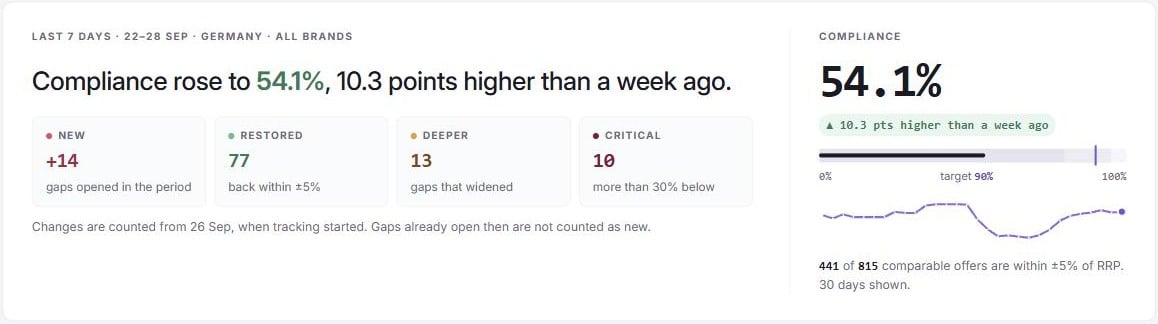 ### The verdict
The first sentence says where compliance stands, compared with the day before the period began (7, 14 or 30 days
before today, in your organisation's time zone):
* "Compliance slipped to 86.4%, 3.1 points lower than a week ago."
* "Compliance rose to …, … points higher than …" or "Compliance held at …, the same as …".
* "Compliance is 86.4%." when there is nothing fair to compare with: the earlier day has no complete data, it was
judged under a different tolerance, or today's figures cover a different set of sources (some are excluded or not
scraped recently). In the last case a second sentence says what today's figures leave out.
With a 7-day period the earlier day reads "a week ago"; otherwise the sentence names the date.
When most gaps below RRP sit at one depth (at least 35% of them), the verdict adds where: "Most gaps sit on one price:
… at …, where 9 of 11 resellers have been since mid-September." When a reseller moved there first, it names it.
The Overview has three other states:
* **All clear**: compliance meets your target, there is nothing under **Where to act** (an ending agreed promotion
does not count), and no source is silent. The verdict reads "Resellers are holding your prices." The page then shows
how many days you have been above target, **What changed for the better** and **Worth watching**: resellers with
offers of three or more products in one product range sitting within half a point of the tolerance below RRP, and
agreed promotions ending within 7 days.
* **Verdict on hold**: sources that have not been scraped within the freshness window, or never, hold 20% or more of
the offers you know about. The page shows which sources are silent, the range compliance must lie in whatever the
unseen offers are, and **Show figures for …**, which excludes the silent sources. Excluded sources are named in a
banner, "Figures exclude …", with **Include it again**. The digest is paused while the verdict is on hold.
* **No data**: "No offer in this scope can be compared with its reference price yet."
In the all-clear and on-hold states, the trend is shown for the last 30 days only, without the range and view toggles
or the gap bars described under [The compliance trend](#the-compliance-trend).
### What changed: New, Restored, Deeper, Critical
Four counters sit under the verdict. **New**, **Restored** and **Deeper** count changes in the period; **Critical** is
a count of now.
| Counter | Counts |
| ------------------------------------- | --------------------------------------------------------------------------------------------------------------------------------------------------------------------------------------------------------------------------------------------------------------------------------------------------------------------------------------------------------------------------------------------------------------------------------- |
| **New** ("gaps opened in the period") | Gaps still open, not covered by an agreed promotion, that opened in the period because the reseller's price moved into the gap. Gaps that appear because you changed the tolerance, because the reference price changed, or that were already there when an offer was first seen are not new. |
| **Restored** ("back within ±5%") | Gaps that closed in the period because the reseller moved the price back within tolerance. If the reference also changed, the price must be within tolerance of the old reference too. A gap that closes because you widened the tolerance or the reference changed is not restored, and neither is one that ends because the offer stopped appearing, can no longer be compared, or jumped from below RRP to above it (or back). |
| **Deeper** ("gaps that widened") | Gaps still open, not covered, that were already open before the period and that the reseller's own price change took at least 1 point further from RRP during it. A gap that widens because the reference moved does not count. |
| **Critical** ("more than 30% below") | Offers more than 30% below RRP now, not covered by an agreed promotion. |
Click **New**, **Deeper** or **Critical** to open **All gaps** filtered to exactly those gaps (with **View Price
Violations**). Under **Restored**, "N cases ready to close →" opens the **Restored** queue on the **Cases** tab when
there are such cases.
Gap history starts when the dashboard was first calculated for your organisation. If that falls inside the period, a
note under the counters says "Changes are counted from 21 Sep, when tracking started. Gaps already open then are not
counted as new." Before the first calculation it says that nothing has been counted yet.
### Compliance
The panel on the right shows:
* the compliance percentage and **target** (your [compliance target](/pricing-intelligence/manufacturer-dashboard/settings),
90% by default), drawn as a gauge;
* the change in points against the same earlier day as the verdict, for example "3.1 pts lower than a week ago".
It is left out whenever the verdict does not compare;
* "N of M comparable offers are within ±5% of RRP." When agreed promotions cover some gaps, it reads "N of M
comparable offers are compliant (within ±5% or in an agreed promotion)." instead;
* a sparkline of daily compliance over the last 30 days ("30 days shown."). Days without complete data are left blank.
When you have excluded sources, the note says the line still covers every source. Point at a day to see its hover
card (see [The compliance trend](#the-compliance-trend)). With **View Price Violations**, a day that had new gaps
says "Click to see the gaps that opened this day and are still open", and clicking it opens **All gaps** filtered to
those gaps.
### Where to act
### The verdict
The first sentence says where compliance stands, compared with the day before the period began (7, 14 or 30 days
before today, in your organisation's time zone):
* "Compliance slipped to 86.4%, 3.1 points lower than a week ago."
* "Compliance rose to …, … points higher than …" or "Compliance held at …, the same as …".
* "Compliance is 86.4%." when there is nothing fair to compare with: the earlier day has no complete data, it was
judged under a different tolerance, or today's figures cover a different set of sources (some are excluded or not
scraped recently). In the last case a second sentence says what today's figures leave out.
With a 7-day period the earlier day reads "a week ago"; otherwise the sentence names the date.
When most gaps below RRP sit at one depth (at least 35% of them), the verdict adds where: "Most gaps sit on one price:
… at …, where 9 of 11 resellers have been since mid-September." When a reseller moved there first, it names it.
The Overview has three other states:
* **All clear**: compliance meets your target, there is nothing under **Where to act** (an ending agreed promotion
does not count), and no source is silent. The verdict reads "Resellers are holding your prices." The page then shows
how many days you have been above target, **What changed for the better** and **Worth watching**: resellers with
offers of three or more products in one product range sitting within half a point of the tolerance below RRP, and
agreed promotions ending within 7 days.
* **Verdict on hold**: sources that have not been scraped within the freshness window, or never, hold 20% or more of
the offers you know about. The page shows which sources are silent, the range compliance must lie in whatever the
unseen offers are, and **Show figures for …**, which excludes the silent sources. Excluded sources are named in a
banner, "Figures exclude …", with **Include it again**. The digest is paused while the verdict is on hold.
* **No data**: "No offer in this scope can be compared with its reference price yet."
In the all-clear and on-hold states, the trend is shown for the last 30 days only, without the range and view toggles
or the gap bars described under [The compliance trend](#the-compliance-trend).
### What changed: New, Restored, Deeper, Critical
Four counters sit under the verdict. **New**, **Restored** and **Deeper** count changes in the period; **Critical** is
a count of now.
| Counter | Counts |
| ------------------------------------- | --------------------------------------------------------------------------------------------------------------------------------------------------------------------------------------------------------------------------------------------------------------------------------------------------------------------------------------------------------------------------------------------------------------------------------- |
| **New** ("gaps opened in the period") | Gaps still open, not covered by an agreed promotion, that opened in the period because the reseller's price moved into the gap. Gaps that appear because you changed the tolerance, because the reference price changed, or that were already there when an offer was first seen are not new. |
| **Restored** ("back within ±5%") | Gaps that closed in the period because the reseller moved the price back within tolerance. If the reference also changed, the price must be within tolerance of the old reference too. A gap that closes because you widened the tolerance or the reference changed is not restored, and neither is one that ends because the offer stopped appearing, can no longer be compared, or jumped from below RRP to above it (or back). |
| **Deeper** ("gaps that widened") | Gaps still open, not covered, that were already open before the period and that the reseller's own price change took at least 1 point further from RRP during it. A gap that widens because the reference moved does not count. |
| **Critical** ("more than 30% below") | Offers more than 30% below RRP now, not covered by an agreed promotion. |
Click **New**, **Deeper** or **Critical** to open **All gaps** filtered to exactly those gaps (with **View Price
Violations**). Under **Restored**, "N cases ready to close →" opens the **Restored** queue on the **Cases** tab when
there are such cases.
Gap history starts when the dashboard was first calculated for your organisation. If that falls inside the period, a
note under the counters says "Changes are counted from 21 Sep, when tracking started. Gaps already open then are not
counted as new." Before the first calculation it says that nothing has been counted yet.
### Compliance
The panel on the right shows:
* the compliance percentage and **target** (your [compliance target](/pricing-intelligence/manufacturer-dashboard/settings),
90% by default), drawn as a gauge;
* the change in points against the same earlier day as the verdict, for example "3.1 pts lower than a week ago".
It is left out whenever the verdict does not compare;
* "N of M comparable offers are within ±5% of RRP." When agreed promotions cover some gaps, it reads "N of M
comparable offers are compliant (within ±5% or in an agreed promotion)." instead;
* a sparkline of daily compliance over the last 30 days ("30 days shown."). Days without complete data are left blank.
When you have excluded sources, the note says the line still covers every source. Point at a day to see its hover
card (see [The compliance trend](#the-compliance-trend)). With **View Price Violations**, a day that had new gaps
says "Click to see the gaps that opened this day and are still open", and clicking it opens **All gaps** filtered to
those gaps.
### Where to act
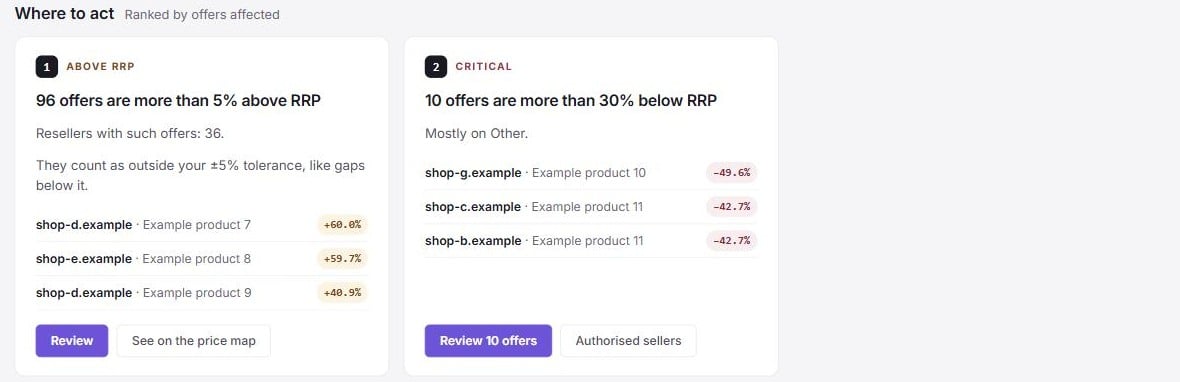 **Where to act** shows up to three cards, **Ranked by offers affected**. When two cards affect the same number of
offers, they keep the order of this table.
| Card | Appears when | Buttons |
| --------------------------- | -------------------------------------------------------------------------------------------------------------------------------------------------------- | --------------------------------------------------------------------------------------------------------------------- |
| **Where the cut started** | Most gaps below RRP sit at one depth and a reseller moved first on those products. The card names the reseller, the cut and the day. | **Open reseller**; **Start case**, **Open case** or **Send follow-up**, depending on the reseller's case. |
| **Decide the policy** | At least 20 gaps are **At the edge**, and they are at least 40% of the gaps below RRP. It asks whether that depth is a gap or simply the street price. | **See the spread** (Price map); **Review tolerance** (settings, with **Compliance settings**). |
| **Critical** | Any offer is more than 30% below RRP. The card names the product ranges they are mostly in and how many come from resellers not on your authorised list. | **Review …** (All gaps, **Critical** view); **Authorised sellers** (Merchants, filtered to resellers not authorised). |
| **Above RRP** | At least 10 offers are more than the tolerance above RRP. They count as gaps just like offers below. | **Review** (All gaps, **Above RRP** view); **Open reseller** when one reseller holds at least half of them. |
| **Not authorised** | At least 5 gaps come from resellers not marked as authorised sellers. | **Review**; **Authorised sellers**. |
| **Agreed promotion ending** | An agreed promotion that covers at least one offer ends within 7 days. | **Agreed promotions** (opens the case it was agreed in). |
Covered gaps are not counted on any card except **Agreed promotion ending**.
### The compliance trend
**Compliance, last 30 days** (or **last 90 days**) shows daily compliance against your target, drawn as a dashed
**Target** line. The legend names **Compliance**, **Target**, **This period** (the days of the period you chose,
shaded) and **Reconstructed** (days rebuilt later from stored prices, shaded). Days without complete data break the
line: nothing is guessed. Under the line, **New and restored gaps per day** draws the day's new gaps upwards and its
restored gaps downwards.
Two toggles sit above the chart:
* **Range**: **30 days** or **90 days**.
* **View**: **Chart**, or **Table**, which lists the same days newest first with **Day**, **Compliance**, **Within
tolerance** (for example "1,180 of 1,240"), **new**, **restored**, **Source** (**Live data**, **Reconstructed from
retained prices** or **No complete data**) and a **Pin** button per day.
Point at a day to see its hover card: the date, compliance and its change in points against the previous day with
data, how many comparable offers were within tolerance, a bar splitting the offers by band, the counts **Below
tolerance**, **Above RRP**, **deep + critical** and **new / restored**, and how many were **covered by an agreed
promotion** when there were any. It also says whether the day is **Reconstructed**, which tolerance it was judged at
("Judged at ±5%") and the day's events. A day without complete data says "No complete data this day. The line breaks
here; nothing is filled in."
**Pin a day** to keep it open: click it on the chart, or click **Pin** in the table. The pinned day replaces the depth
panel beside the chart and shows, under **Pinned day**:
* the date, compliance and its change;
* the comparable offers within tolerance and the gaps per band (**At the edge**, **Moderate**, **Deep**,
**Critical**, **Above RRP**);
* the day's **new** and **restored** gaps and its events;
* which tolerance the day was judged at and where its figures come from, for example "Judged at ±5% · Live data";
* **Gaps that opened this day and are still open →**, which opens **All gaps** filtered to that day, with gaps
covered by an agreed promotion included (needs **View Price Violations**).
Use the arrows beside the date (or **←** and **→** while the panel has focus) to move to the previous or next day,
and **×** (or **Esc**) to unpin. Click the pinned day again to unpin it. Switching the range drops a pinned day the new
range does not show. The range, the view and the pinned day are part of the page address, so a copied link opens the
same view.
**What happened** lists the events on the chart, numbered as on the chart, oldest first ("A description only; no cause
is claimed."). An event is one of:
| Event | Link, when you have the permission |
| ------------------------------------------------------------------ | --------------------------------------------------------------------------- |
| A reseller moved first on some products | **Open the reseller** (the reseller record) |
| At least three more resellers than the day before sit at one price | **See on the price map** |
| The tolerance changed | **Review the tolerance** (settings, with **Compliance settings**) |
| An agreed promotion started or ended | **Agreed promotions** (the **Agreed promotion** queue on the **Cases** tab) |
The 30-day range shows at most eight events, and the 90-day range at most sixteen.
When the range has no day with complete data, the chart reads "No complete days in this range yet".
### Depth and ledgers
* **How deep the N gaps are**: gaps not covered by a promotion, per band. It sits beside the trend while no day is
pinned.
* **Price gap, one unit per offer**: the sum of (RRP − price) over the offers below RRP, per currency. It is a plain
sum, not a sales forecast.
* **Resellers furthest off RRP**: the six resellers with the most gaps, with **Off RRP** (offers outside tolerance
now, not counting covered ones, and the products they cover), **Compliance** (a dash when none of the reseller's
offers could be compared), **30 days** (the reseller's daily compliance, green while it is restoring prices, grey
otherwise; point at a day for its hover card) and **Status**. **All N →** opens **All gaps** grouped by reseller.
* **Products where the price moved most**: the six products with the most resellers off RRP, with the **Median**
deviation and **Settled at**, the price most resellers converged on. **Settled at** shows "none" unless at least
3 resellers, and at least 40% of them, hold one price.
A reseller's **Status** is the first of these that applies:
| Status | Means |
| -------------------- | -------------------------------------------------------------------------------------------------------------------------------------------------------------- |
| **Moved first** | It was the first to move a product's price outside tolerance, among at least three comparable sellers of that product. |
| **New this period** | Every gap it has open opened within the period. |
| **Restoring** | It closed gaps in the period, and its compliance is higher than on the day before the period began. |
| **Since …** | Off RRP since that date, when its oldest open gap opened. |
| **Off RRP** | It has offers outside tolerance, but no tracked gap dates them yet. |
| **No comparison** | None of its current offers could be compared with an RRP. Usually its products have no RRP on the market's price level, or its offers are in another currency. |
| **Within tolerance** | Every comparable offer is within tolerance or covered by an agreed promotion. |
Click a reseller's name anywhere on the page to open its **Reseller record** (needs **View Merchant Compliance**):
its compliance over the period, what happened, its current gaps by product range, its contact details and account
manager, and the case actions you are allowed. Days below your target are shaded on its compliance line. Point at a
day for its hover card; with **View Price Violations**, click a day that had new gaps to open **All gaps** with this
reseller's gaps that opened that day and are still open.
## Price map tab
**Where to act** shows up to three cards, **Ranked by offers affected**. When two cards affect the same number of
offers, they keep the order of this table.
| Card | Appears when | Buttons |
| --------------------------- | -------------------------------------------------------------------------------------------------------------------------------------------------------- | --------------------------------------------------------------------------------------------------------------------- |
| **Where the cut started** | Most gaps below RRP sit at one depth and a reseller moved first on those products. The card names the reseller, the cut and the day. | **Open reseller**; **Start case**, **Open case** or **Send follow-up**, depending on the reseller's case. |
| **Decide the policy** | At least 20 gaps are **At the edge**, and they are at least 40% of the gaps below RRP. It asks whether that depth is a gap or simply the street price. | **See the spread** (Price map); **Review tolerance** (settings, with **Compliance settings**). |
| **Critical** | Any offer is more than 30% below RRP. The card names the product ranges they are mostly in and how many come from resellers not on your authorised list. | **Review …** (All gaps, **Critical** view); **Authorised sellers** (Merchants, filtered to resellers not authorised). |
| **Above RRP** | At least 10 offers are more than the tolerance above RRP. They count as gaps just like offers below. | **Review** (All gaps, **Above RRP** view); **Open reseller** when one reseller holds at least half of them. |
| **Not authorised** | At least 5 gaps come from resellers not marked as authorised sellers. | **Review**; **Authorised sellers**. |
| **Agreed promotion ending** | An agreed promotion that covers at least one offer ends within 7 days. | **Agreed promotions** (opens the case it was agreed in). |
Covered gaps are not counted on any card except **Agreed promotion ending**.
### The compliance trend
**Compliance, last 30 days** (or **last 90 days**) shows daily compliance against your target, drawn as a dashed
**Target** line. The legend names **Compliance**, **Target**, **This period** (the days of the period you chose,
shaded) and **Reconstructed** (days rebuilt later from stored prices, shaded). Days without complete data break the
line: nothing is guessed. Under the line, **New and restored gaps per day** draws the day's new gaps upwards and its
restored gaps downwards.
Two toggles sit above the chart:
* **Range**: **30 days** or **90 days**.
* **View**: **Chart**, or **Table**, which lists the same days newest first with **Day**, **Compliance**, **Within
tolerance** (for example "1,180 of 1,240"), **new**, **restored**, **Source** (**Live data**, **Reconstructed from
retained prices** or **No complete data**) and a **Pin** button per day.
Point at a day to see its hover card: the date, compliance and its change in points against the previous day with
data, how many comparable offers were within tolerance, a bar splitting the offers by band, the counts **Below
tolerance**, **Above RRP**, **deep + critical** and **new / restored**, and how many were **covered by an agreed
promotion** when there were any. It also says whether the day is **Reconstructed**, which tolerance it was judged at
("Judged at ±5%") and the day's events. A day without complete data says "No complete data this day. The line breaks
here; nothing is filled in."
**Pin a day** to keep it open: click it on the chart, or click **Pin** in the table. The pinned day replaces the depth
panel beside the chart and shows, under **Pinned day**:
* the date, compliance and its change;
* the comparable offers within tolerance and the gaps per band (**At the edge**, **Moderate**, **Deep**,
**Critical**, **Above RRP**);
* the day's **new** and **restored** gaps and its events;
* which tolerance the day was judged at and where its figures come from, for example "Judged at ±5% · Live data";
* **Gaps that opened this day and are still open →**, which opens **All gaps** filtered to that day, with gaps
covered by an agreed promotion included (needs **View Price Violations**).
Use the arrows beside the date (or **←** and **→** while the panel has focus) to move to the previous or next day,
and **×** (or **Esc**) to unpin. Click the pinned day again to unpin it. Switching the range drops a pinned day the new
range does not show. The range, the view and the pinned day are part of the page address, so a copied link opens the
same view.
**What happened** lists the events on the chart, numbered as on the chart, oldest first ("A description only; no cause
is claimed."). An event is one of:
| Event | Link, when you have the permission |
| ------------------------------------------------------------------ | --------------------------------------------------------------------------- |
| A reseller moved first on some products | **Open the reseller** (the reseller record) |
| At least three more resellers than the day before sit at one price | **See on the price map** |
| The tolerance changed | **Review the tolerance** (settings, with **Compliance settings**) |
| An agreed promotion started or ended | **Agreed promotions** (the **Agreed promotion** queue on the **Cases** tab) |
The 30-day range shows at most eight events, and the 90-day range at most sixteen.
When the range has no day with complete data, the chart reads "No complete days in this range yet".
### Depth and ledgers
* **How deep the N gaps are**: gaps not covered by a promotion, per band. It sits beside the trend while no day is
pinned.
* **Price gap, one unit per offer**: the sum of (RRP − price) over the offers below RRP, per currency. It is a plain
sum, not a sales forecast.
* **Resellers furthest off RRP**: the six resellers with the most gaps, with **Off RRP** (offers outside tolerance
now, not counting covered ones, and the products they cover), **Compliance** (a dash when none of the reseller's
offers could be compared), **30 days** (the reseller's daily compliance, green while it is restoring prices, grey
otherwise; point at a day for its hover card) and **Status**. **All N →** opens **All gaps** grouped by reseller.
* **Products where the price moved most**: the six products with the most resellers off RRP, with the **Median**
deviation and **Settled at**, the price most resellers converged on. **Settled at** shows "none" unless at least
3 resellers, and at least 40% of them, hold one price.
A reseller's **Status** is the first of these that applies:
| Status | Means |
| -------------------- | -------------------------------------------------------------------------------------------------------------------------------------------------------------- |
| **Moved first** | It was the first to move a product's price outside tolerance, among at least three comparable sellers of that product. |
| **New this period** | Every gap it has open opened within the period. |
| **Restoring** | It closed gaps in the period, and its compliance is higher than on the day before the period began. |
| **Since …** | Off RRP since that date, when its oldest open gap opened. |
| **Off RRP** | It has offers outside tolerance, but no tracked gap dates them yet. |
| **No comparison** | None of its current offers could be compared with an RRP. Usually its products have no RRP on the market's price level, or its offers are in another currency. |
| **Within tolerance** | Every comparable offer is within tolerance or covered by an agreed promotion. |
Click a reseller's name anywhere on the page to open its **Reseller record** (needs **View Merchant Compliance**):
its compliance over the period, what happened, its current gaps by product range, its contact details and account
manager, and the case actions you are allowed. Days below your target are shaded on its compliance line. Point at a
day for its hover card; with **View Price Violations**, click a day that had new gaps to open **All gaps** with this
reseller's gaps that opened that day and are still open.
## Price map tab
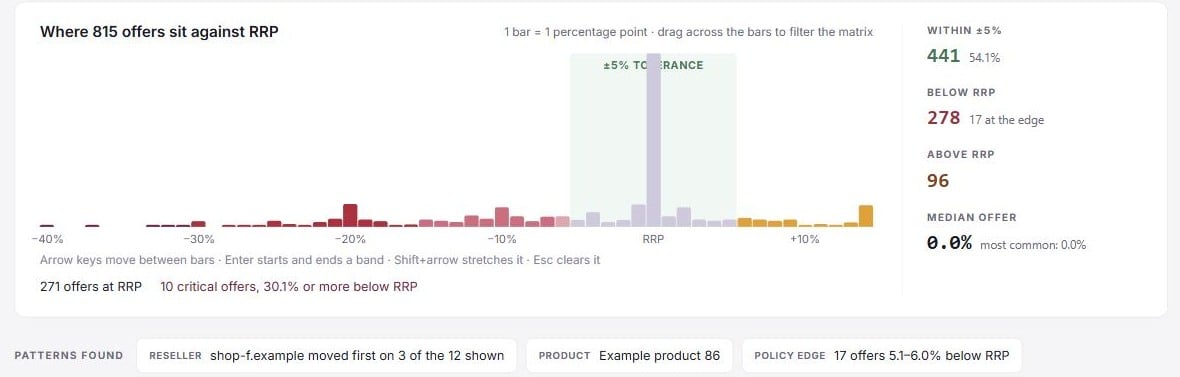
 The **Price map** shows where every comparable offer sits against RRP. Its status line reads, for example, "As of
21 Sep, 09:23 · 1,905 comparable offers · 182 products · 38 resellers · reference: RRP · 47 not comparable".
With **All markets** and several reference levels it says "reference: per market".
* **The histogram** ("Where N offers sit against RRP"): one bar per percentage point of deviation, coloured by band,
with the ±tolerance band marked. The bars at each end also hold every offer further out. Drag across bars (or use
the arrow keys and Enter) to select a band of deviations; the matrix then keeps only the products with an offer in
it. **Open these N gaps in All gaps** opens exactly those offers in the register. **Clear the band** removes it.
* **Stats**: **Within ±5%**, **In agreed promotions** (only when promotions cover offers), **Below RRP** with how many
are at the edge, **Above RRP** with the reseller holding most of them, and the **Median offer** deviation with the
most common one.
* **Patterns found**: toggles that highlight what they count: a reseller that moved first on several of the products
shown, a product where many resellers sit at one price, and the offers at the policy edge.
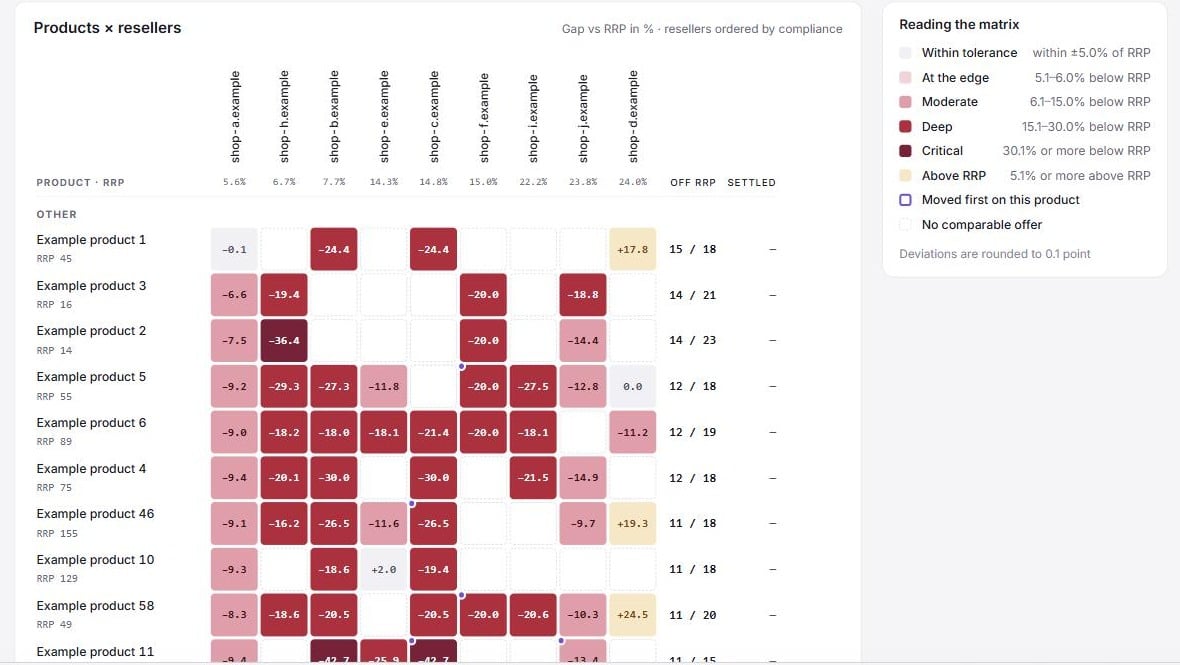
* **Products × resellers**: products in rows, grouped by product range, and resellers in columns, ordered by
compliance. Each cell shows the reseller's gap against RRP in %, tinted by band. When a reseller has several offers
of a product, the cell shows the one furthest from RRP. A dashed cell means no comparable offer. A marker shows the
reseller that moved first on that product. **Show N more products** loads more rows; the matrix shows up to 40
resellers.
Click a cell to open **Selected cell**: the price and reference with when they were seen, whether the reseller moved
first, the price over the last 30 days, the case the offer is in, **Open price history** and **Open the offer**.
Point at the price line to see when each price was seen, the price, and how far it was from the reference in force
at that moment. The dashed line is today's reference, so after a reference change the two can differ.
## All gaps tab
The **Price map** shows where every comparable offer sits against RRP. Its status line reads, for example, "As of
21 Sep, 09:23 · 1,905 comparable offers · 182 products · 38 resellers · reference: RRP · 47 not comparable".
With **All markets** and several reference levels it says "reference: per market".
* **The histogram** ("Where N offers sit against RRP"): one bar per percentage point of deviation, coloured by band,
with the ±tolerance band marked. The bars at each end also hold every offer further out. Drag across bars (or use
the arrow keys and Enter) to select a band of deviations; the matrix then keeps only the products with an offer in
it. **Open these N gaps in All gaps** opens exactly those offers in the register. **Clear the band** removes it.
* **Stats**: **Within ±5%**, **In agreed promotions** (only when promotions cover offers), **Below RRP** with how many
are at the edge, **Above RRP** with the reseller holding most of them, and the **Median offer** deviation with the
most common one.
* **Patterns found**: toggles that highlight what they count: a reseller that moved first on several of the products
shown, a product where many resellers sit at one price, and the offers at the policy edge.
* **Products × resellers**: products in rows, grouped by product range, and resellers in columns, ordered by
compliance. Each cell shows the reseller's gap against RRP in %, tinted by band. When a reseller has several offers
of a product, the cell shows the one furthest from RRP. A dashed cell means no comparable offer. A marker shows the
reseller that moved first on that product. **Show N more products** loads more rows; the matrix shows up to 40
resellers.
Click a cell to open **Selected cell**: the price and reference with when they were seen, whether the reseller moved
first, the price over the last 30 days, the case the offer is in, **Open price history** and **Open the offer**.
Point at the price line to see when each price was seen, the price, and how far it was from the reference in force
at that moment. The dashed line is today's reference, so after a reference change the two can differ.
## All gaps tab
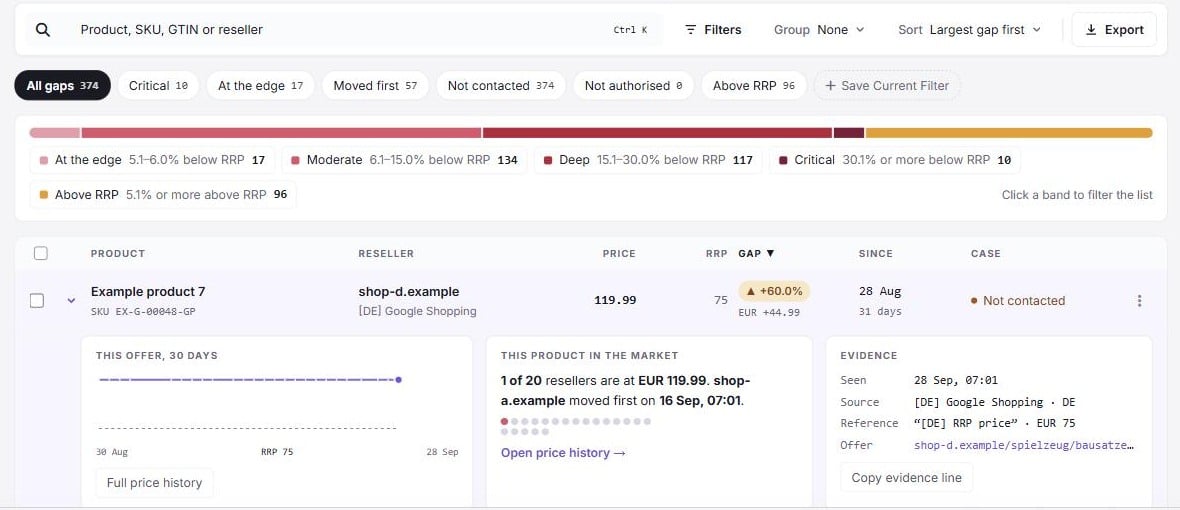 **All gaps** lists every gap, one row per offer outside the tolerance. Only fresh offers are listed. Gaps covered by an
agreed promotion are hidden unless you include them in the filters.
### Columns
| Column | Shows |
| ------------ | ---------------------------------------------------------------------------------------------------------------------------------------------------------------------------- |
| **Product** | The product and its SKU. |
| **Reseller** | The reseller, with tags such as **Moved first**, **Not authorised**, **New** or **Above RRP**. |
| **Price** | The offer's price. |
| **RRP** | The reference price. "RRP changed after the last scrape" warns that the reference has moved since the price was seen. |
| **Gap** | The deviation, tinted by band. |
| **Since** | The first scrape that saw the gap. "before …" means the gap was already there when tracking started. |
| **Case** | **Not contacted**, **New case**, **Same products as …** (another reseller's case holds this product at this price), the case number with its state, or **Agreed promotion**. |
Click a row to show its details: the offer's prices over 30 days, how many resellers are at the same price and who
moved first, and the evidence (when it was seen, source, reference and offer link). Point at the price line for each
price's time and deviation, as in the price map's **Selected cell**. **Copy evidence line** puts one line of evidence
on the clipboard.
The footer shows the rows on the page, the total and the sum of the gaps.
### Views, search and filters
* **Views**: **All gaps**, **Critical**, **At the edge**, **Moved first**, **Not contacted** (no case of their own, or
a case with no message yet), **Not authorised** and **Above RRP**. You can also save the current view and filters as
your own view.
* **Search**: product, SKU, GTIN or reseller.
* **Gaps by depth**: click a band in the strip to filter the list to it.
* **Filters**: **Depth** (bands, or a deviation range in whole-point steps, as on the price map), **Include gaps
covered by an agreed promotion**, **Case status**, **When** (**Opened** or **Deepened** in the last 7, 14 or 30
days), and lists of resellers, products, sources and product ranges. Active filters show as chips above the list.
A link from a day on a trend or compliance line adds the chip **Opened on** with that date: only gaps that opened
that day and are still open. It replaces an **Opened** window; choose **Anytime** under **When**, or remove the chip,
to clear it.
* **Group**: **None**, **Reseller**, **Product**, **Product range**, **Source** or **Case status**. A reseller group
offers **Start case** or **Open case**.
* **Sort**: **Largest gap first**, **Newest first**, **Oldest first**, **Largest amount first**, **Reseller A–Z**,
**Product A–Z**. Groups sort by **Most gaps first**, **Deepest gap first**, **Most recent first** or **Name A–Z**.
### Acting on several gaps
Select rows to show the bulk bar. You can act on up to 500 gaps at once.
* **Add to case**: adds the gaps to each reseller's open case in that market, or starts one (**Manage cases**).
* **Mark as agreed promotion**: records a promotion for the selected gaps below RRP, one per reseller and market
(**Agreed promotions**). See [Agreed promotions](/pricing-intelligence/manufacturer-dashboard/agreed-promotions).
* **Snooze**: snoozes the cases the gaps are in. Every selected gap must already be in a case.
* **Export evidence**: exports the selected rows (**Export Data**).
After **Add to case**, **Mark as agreed promotion** or **Snooze**, an undo bar stays up for 8 seconds.
### Export
With the **Export Data** permission, click **Export**:
* **Which rows**: **Current view** (market, brand, filters and search), **Selected rows**, or **Every gap** (all
markets and brands you can see).
* **Format**: **Excel** (one sheet), **CSV**, or **Evidence pack** (one CSV per reseller plus a summary, zipped).
* **Include**: offer URL and scrape time for every row; who moved first and the case status; and, for Excel and the
evidence pack, the offers that cannot be compared.
An export can hold up to 10,000 rows. Narrow the view to export more. Times in the CSV files are in UTC.
**All gaps** lists every gap, one row per offer outside the tolerance. Only fresh offers are listed. Gaps covered by an
agreed promotion are hidden unless you include them in the filters.
### Columns
| Column | Shows |
| ------------ | ---------------------------------------------------------------------------------------------------------------------------------------------------------------------------- |
| **Product** | The product and its SKU. |
| **Reseller** | The reseller, with tags such as **Moved first**, **Not authorised**, **New** or **Above RRP**. |
| **Price** | The offer's price. |
| **RRP** | The reference price. "RRP changed after the last scrape" warns that the reference has moved since the price was seen. |
| **Gap** | The deviation, tinted by band. |
| **Since** | The first scrape that saw the gap. "before …" means the gap was already there when tracking started. |
| **Case** | **Not contacted**, **New case**, **Same products as …** (another reseller's case holds this product at this price), the case number with its state, or **Agreed promotion**. |
Click a row to show its details: the offer's prices over 30 days, how many resellers are at the same price and who
moved first, and the evidence (when it was seen, source, reference and offer link). Point at the price line for each
price's time and deviation, as in the price map's **Selected cell**. **Copy evidence line** puts one line of evidence
on the clipboard.
The footer shows the rows on the page, the total and the sum of the gaps.
### Views, search and filters
* **Views**: **All gaps**, **Critical**, **At the edge**, **Moved first**, **Not contacted** (no case of their own, or
a case with no message yet), **Not authorised** and **Above RRP**. You can also save the current view and filters as
your own view.
* **Search**: product, SKU, GTIN or reseller.
* **Gaps by depth**: click a band in the strip to filter the list to it.
* **Filters**: **Depth** (bands, or a deviation range in whole-point steps, as on the price map), **Include gaps
covered by an agreed promotion**, **Case status**, **When** (**Opened** or **Deepened** in the last 7, 14 or 30
days), and lists of resellers, products, sources and product ranges. Active filters show as chips above the list.
A link from a day on a trend or compliance line adds the chip **Opened on** with that date: only gaps that opened
that day and are still open. It replaces an **Opened** window; choose **Anytime** under **When**, or remove the chip,
to clear it.
* **Group**: **None**, **Reseller**, **Product**, **Product range**, **Source** or **Case status**. A reseller group
offers **Start case** or **Open case**.
* **Sort**: **Largest gap first**, **Newest first**, **Oldest first**, **Largest amount first**, **Reseller A–Z**,
**Product A–Z**. Groups sort by **Most gaps first**, **Deepest gap first**, **Most recent first** or **Name A–Z**.
### Acting on several gaps
Select rows to show the bulk bar. You can act on up to 500 gaps at once.
* **Add to case**: adds the gaps to each reseller's open case in that market, or starts one (**Manage cases**).
* **Mark as agreed promotion**: records a promotion for the selected gaps below RRP, one per reseller and market
(**Agreed promotions**). See [Agreed promotions](/pricing-intelligence/manufacturer-dashboard/agreed-promotions).
* **Snooze**: snoozes the cases the gaps are in. Every selected gap must already be in a case.
* **Export evidence**: exports the selected rows (**Export Data**).
After **Add to case**, **Mark as agreed promotion** or **Snooze**, an undo bar stays up for 8 seconds.
### Export
With the **Export Data** permission, click **Export**:
* **Which rows**: **Current view** (market, brand, filters and search), **Selected rows**, or **Every gap** (all
markets and brands you can see).
* **Format**: **Excel** (one sheet), **CSV**, or **Evidence pack** (one CSV per reseller plus a summary, zipped).
* **Include**: offer URL and scrape time for every row; who moved first and the case status; and, for Excel and the
evidence pack, the offers that cannot be compared.
An export can hold up to 10,000 rows. Narrow the view to export more. Times in the CSV files are in UTC.