> ## Documentation Index
> Fetch the complete documentation index at: https://docs.omnilinker.pl/llms.txt
> Use this file to discover all available pages before exploring further.
# Cases
> Group a reseller's price gaps into a case, contact the reseller, and follow the case until prices are restored.
A case holds the gaps of one reseller in one market that you follow up together. It records every message, note and
change, and moves between queues by itself as prices change and contact steps come due. A reseller has at most one
open case per market.
Open **Pricing Intelligence** > **Manufacturer Dashboard** and choose the **Cases** tab. You need the **Cases**
permission to see it; the actions below need more (see [Permissions](#permissions)). For what counts as a gap, see
[Key terms](/pricing-intelligence/manufacturer-dashboard/overview#key-terms).
Messages to resellers inform and ask. Each one says that recommended prices are for information only and that the
reseller decides the prices in its shop.
## The Cases tab
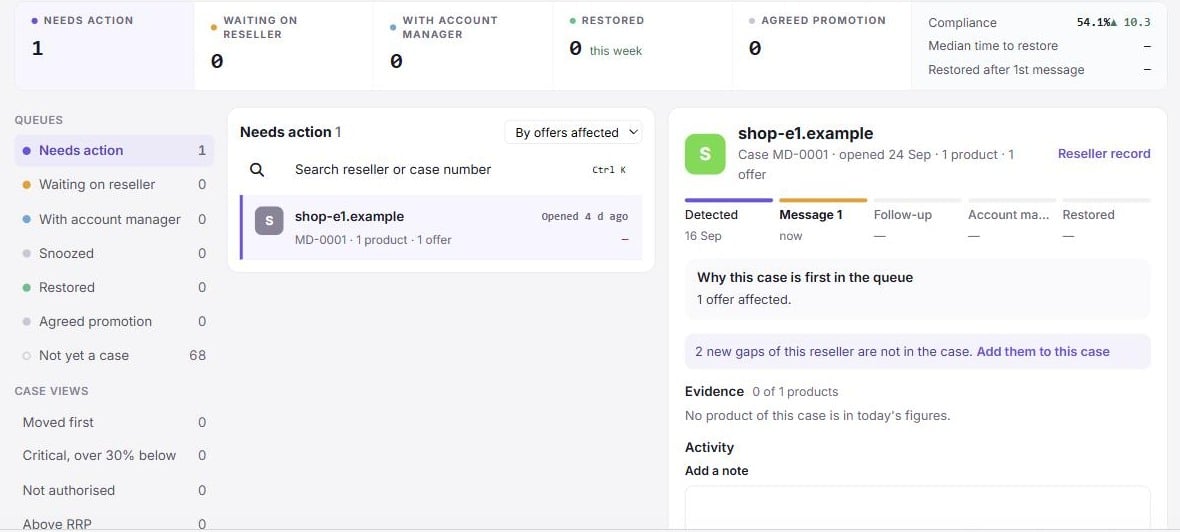 * **The pipeline** across the top shows how many cases sit in each queue, with "new today", "overdue", "due this week"
and promotions ending, plus three figures: **Compliance**, **Median time to restore** and **Restored after 1st
message**.
* **Queues** on the left: **Needs action**, **Waiting on reseller**, **With account manager**, **Snoozed**,
**Restored**, **Agreed promotion** and **Closed**. **Not yet a case** lists resellers with gaps in view and no open
case in that market, each with **Start case**.
* **Case views** narrow the list: **Moved first**, **Critical, over 30% below**, **Not authorised** and **Above RRP**.
* **Contact rules** shows your follow-up and account-manager days ("Reminder → follow-up after 3 days → account
manager after 7. Messages inform and ask."). With the **Compliance settings** permission, **Edit rules** opens the
settings.
* **The case list**: search by reseller or case number, and sort **By offers affected**, **By due date**, **By
opening date** or **By reseller**. Each row shows the reseller, the products and offers in the case, the deepest gap,
what is due, and tags such as **Moved first**, **Critical**, **Reopened** or **Ready to close**.
* **The case detail**: the case number (for example `MD-0142`), the case steps, the **Evidence** table (product, RRP,
the price now, the gap, source and offer link), the **Activity** log, a note form and the action buttons.
When nothing needs you, the list is replaced by "Nothing needs you today", with what was restored this week and what
comes due next.
### Keyboard shortcuts
With the case list or detail focused: **J** next case, **K** previous case, **F** send the follow-up (or the first
message), **A** hand to the account manager, **P** agreed promotion, **S** snooze for 7 days. A shortcut does nothing
when the matching button is not offered.
## How a case is opened
You open cases; Omnilinker does not open one for every new gap. You can start or add to a case from:
* **Not yet a case** on the **Cases** tab: **Start case**;
* a **Where the cut started** card on the **Overview**: **Start case**;
* **All gaps**: select gaps and click **Add to case**, or group by reseller and click **Start case**;
* the reseller record: **Start case**.
Starting a case for a reseller that already has an open case in that market adds the gaps to that case instead.
Omnilinker adds gaps or reopens a case by itself in two situations:
* **Prices dropped again.** When a product that a case restored goes back below the tolerance, the reseller's open case
takes the new gap. If the case was already restored or closed, and the product was restored in the last 30 days, the
case reopens with the gaps below RRP on those products. Gaps on products that no case of the reseller ever held are
never added on their own.
* **An agreed promotion ended** with prices still below RRP. The gaps go back into the case the promotion was agreed
in, or the reseller's open case in that market, or a new case. They are marked "still below the reference after the
agreed promotion ended".
When new gaps of the reseller appear that are not in the case, the detail says so and offers **Add them to this case**.
## Case lifecycle
A case moves through these steps, shown at the top of the detail: **Detected**, **Message 1**, **Follow-up**,
**Account manager**, and **Partly restored** or **Restored**. Omnilinker works out its queue each time you look:
| Queue | When |
| ------------------------ | ------------------------------------------------------------------------------------------------------------------------------------------------------------------------------------------------------------------------------------------------------------------ |
| **Closed** | You closed the case. |
| **Snoozed** | The case is snoozed until a later date. |
| **Restored** | No product in the case is open any more, at least one was restored by the reseller, and none simply stopped being seen. The case gets here by itself after the scrape that finds the prices restored. |
| **Needs action** | Something needs a person: a message was not delivered, an agreed promotion ended, restored products wait for review, the case reopened, or nothing is left open. Also when no message has been sent yet, the follow-up is due, or the account manager step is due. |
| **Agreed promotion** | Every open gap in the case is covered by an agreed promotion. Such a case never asks for a message or a follow-up. |
| **With account manager** | You handed the case to an account manager. |
| **Waiting on reseller** | A message went out and nothing is due yet. |
### What happens to each gap in a case
The **Cases** group of the glossary (click **Terms** in the page header) names what can happen to each offer a case
follows:
| Term | Means |
| ------------ | ---------------------------------------------------------------------------------------------------------------------------- |
| **Open** | The offer is still off RRP. |
| **Restored** | The reseller brought the offer back within tolerance. It stays in the case until you mark the restored products as reviewed. |
| **Resolved** | A restored offer you marked as reviewed; the case no longer follows it. |
| **Lapsed** | The gap ended without the price coming back: the offer disappeared, the RRP changed, or it can no longer be compared. |
| **Removed** | A person took it off the case. |
### Follow-up and account manager days
Both are counted in days from the first message, in your organisation's time zone:
* the **follow-up** comes due after the follow-up days (3 by default), when exactly one message has been sent;
* the **account manager** step comes due after the account-manager days (7 by default), when the case has not been
handed over yet.
Change them in [Compliance settings](/pricing-intelligence/manufacturer-dashboard/settings). A change re-dates every
open case.
## Message a reseller
You need the **Send messages to resellers** permission.
In the case detail, click **Send reminder** for the first message, **Send follow-up** after it, or **Send a
thank-you** once products are restored.
Choose the **Template** (**RRP reminder · first message**, **RRP reminder · follow-up** or **Thank-you**) and the
**Language** (**English** or **Polski**). Read the preview; add a **Personal note (optional)** of up to 1,000
characters.
**Attach evidence (CSV) for all N products** is ticked by default. Click **Preview** to see the file.
Click **Send message** (or **Send follow-up**, **Send thank-you**). Optionally tick **Note it on the N cases with
the same products** to leave a line on other resellers' cases that hold the same products.
What the reseller receives:
* **Reminders and follow-ups** cover the products in the case that are below RRP and not in an agreed promotion. Gaps
above RRP stay listed in the case but are never e-mailed. If the case has no such gap and nothing was restored, the
detail explains that there is nothing to e-mail.
* **A thank-you** lists the restored products. It does not count as contact, so it does not move follow-up dates.
* The subject is "Example Brand recommended prices", "Following up: Example Brand recommended prices" or "Thank you:
Example Brand prices".
* The body gives the number of products, when they were checked and how far below RRP they typically were, your
personal note, and a signature with your name, your e-mail address and your organisation's name.
* The evidence CSV has one row per product: product, SKU, GTIN, reference price level, recommended price, currency,
price in the shop, difference (%), when it was checked (UTC), source and offer link.
The templates are fixed; you cannot edit them. The language defaults to the reseller's **Message language**, or to
Polish for the Polish market and English elsewhere.
The message is sent by e-mail to the reseller's contact address, from the address Omnilinker sends e-mail from. It has
no separate reply-to address. The reseller can reply to you using the address in the signature.
Sending happens in the background. The activity log shows "Message 1 queued", then "Message 1 sent" or "Message 1 not
delivered". A failed send is retried after 2 and then 10 minutes; after the third failure the case moves to **Needs
action** with "Message not delivered".
### When the reseller has no e-mail address
The dialog says "No contact on file" for the reseller. You can:
* type an **Email address**, and, with **Merchant** > **Update**, tick **Save it on the reseller record for next
time**;
* click **Copy message and evidence**, send it by phone or marketplace chat, and log it as sent another way;
* **Hand to the account manager**, who may have a direct contact.
### Log a message sent another way
Click **Log a message sent another way**. Choose **How was it sent?** (**Phone**, **Marketplace chat** or **Other**),
**When** (not in the future), and optionally **What was said**, then click **Log message**. A logged reminder or
follow-up counts as contact from the day you give. E-mail cannot be logged: send it from the dialog.
### Log the reseller's reply
In the note form, tick **This is the reseller's reply** and click **Log reply**. Replies and notes can have up to
1,000 characters.
## Other case actions
These need the **Manage cases** permission.
* **Add a note**: type in the note form and click **Save note**.
* **Hand to account manager**: choose the **Account manager** (an active user of your organisation, prefilled with the
reseller's), add an optional note and click **Hand over**. The person is notified in Omnilinker. With **Merchant** >
**Update**, tick **Save as this reseller's account manager** to store the choice on the reseller.
* **Agreed promotion**: record a promotion you agreed with the reseller; see
[Agreed promotions](/pricing-intelligence/manufacturer-dashboard/agreed-promotions). Also needs **Agreed
promotions**.
* **Snooze**: hide the case for 3, 7 or 14 days. A case can be snoozed for at most 30 days. **End snooze** brings it
back.
* **Mark restored products as reviewed**: when some products are restored, a banner on the tab and the detail show
"N of M products are back within ±5%". Choose **Close the N, keep M open**, or **Close the whole case**. A closed
case reopens by itself if prices drop again within 30 days.
### Reseller contact details
The reseller record (click the reseller's name) shows **Email**, **Phone**, **Contact person**, **Message language**,
**Preferred contact** and **Account manager**. **Edit contact** needs both **Manage cases** and **Merchant** >
**Update**, because the e-mail address is where messages go. Every open case of the reseller logs "Contact details
updated".
## Close or reopen a case
Click **Close case**, choose **Why is this case closed?**, add an optional note and click **Close case**. The reasons
offered depend on the case:
| Reason | Offered when |
| ----------------------- | ------------------------------------------------------------------------------------------------- |
| **Prices restored** | The case is restored, or nothing is left open and something was restored. It is the default then. |
| **Agreed promotion** | The case is in the **Agreed promotion** queue. |
| **Handled another way** | Always. The default otherwise. |
| **Not pursued** | Always. |
**Reopen case** reopens a closed or restored case. It is refused when the reseller already has another open case in
that market.
## Permissions
| Action | Permission |
| -------------------------------------------------------------------------------------- | ------------------------------------------ |
| See the **Cases** tab and case details | **Cases** |
| Start cases, add gaps, snooze, hand over, notes, review restorations, close and reopen | **Manage cases** |
| Send, preview and log messages | **Send messages to resellers** |
| Save a typed address on the reseller; edit the reseller's contact | **Merchant** > **Update** (with the above) |
| Record an agreed promotion | **Agreed promotions** |
See [Setup](/pricing-intelligence/manufacturer-dashboard/setup-checklist#permissions) for which roles received these
permissions automatically.
* **The pipeline** across the top shows how many cases sit in each queue, with "new today", "overdue", "due this week"
and promotions ending, plus three figures: **Compliance**, **Median time to restore** and **Restored after 1st
message**.
* **Queues** on the left: **Needs action**, **Waiting on reseller**, **With account manager**, **Snoozed**,
**Restored**, **Agreed promotion** and **Closed**. **Not yet a case** lists resellers with gaps in view and no open
case in that market, each with **Start case**.
* **Case views** narrow the list: **Moved first**, **Critical, over 30% below**, **Not authorised** and **Above RRP**.
* **Contact rules** shows your follow-up and account-manager days ("Reminder → follow-up after 3 days → account
manager after 7. Messages inform and ask."). With the **Compliance settings** permission, **Edit rules** opens the
settings.
* **The case list**: search by reseller or case number, and sort **By offers affected**, **By due date**, **By
opening date** or **By reseller**. Each row shows the reseller, the products and offers in the case, the deepest gap,
what is due, and tags such as **Moved first**, **Critical**, **Reopened** or **Ready to close**.
* **The case detail**: the case number (for example `MD-0142`), the case steps, the **Evidence** table (product, RRP,
the price now, the gap, source and offer link), the **Activity** log, a note form and the action buttons.
When nothing needs you, the list is replaced by "Nothing needs you today", with what was restored this week and what
comes due next.
### Keyboard shortcuts
With the case list or detail focused: **J** next case, **K** previous case, **F** send the follow-up (or the first
message), **A** hand to the account manager, **P** agreed promotion, **S** snooze for 7 days. A shortcut does nothing
when the matching button is not offered.
## How a case is opened
You open cases; Omnilinker does not open one for every new gap. You can start or add to a case from:
* **Not yet a case** on the **Cases** tab: **Start case**;
* a **Where the cut started** card on the **Overview**: **Start case**;
* **All gaps**: select gaps and click **Add to case**, or group by reseller and click **Start case**;
* the reseller record: **Start case**.
Starting a case for a reseller that already has an open case in that market adds the gaps to that case instead.
Omnilinker adds gaps or reopens a case by itself in two situations:
* **Prices dropped again.** When a product that a case restored goes back below the tolerance, the reseller's open case
takes the new gap. If the case was already restored or closed, and the product was restored in the last 30 days, the
case reopens with the gaps below RRP on those products. Gaps on products that no case of the reseller ever held are
never added on their own.
* **An agreed promotion ended** with prices still below RRP. The gaps go back into the case the promotion was agreed
in, or the reseller's open case in that market, or a new case. They are marked "still below the reference after the
agreed promotion ended".
When new gaps of the reseller appear that are not in the case, the detail says so and offers **Add them to this case**.
## Case lifecycle
A case moves through these steps, shown at the top of the detail: **Detected**, **Message 1**, **Follow-up**,
**Account manager**, and **Partly restored** or **Restored**. Omnilinker works out its queue each time you look:
| Queue | When |
| ------------------------ | ------------------------------------------------------------------------------------------------------------------------------------------------------------------------------------------------------------------------------------------------------------------ |
| **Closed** | You closed the case. |
| **Snoozed** | The case is snoozed until a later date. |
| **Restored** | No product in the case is open any more, at least one was restored by the reseller, and none simply stopped being seen. The case gets here by itself after the scrape that finds the prices restored. |
| **Needs action** | Something needs a person: a message was not delivered, an agreed promotion ended, restored products wait for review, the case reopened, or nothing is left open. Also when no message has been sent yet, the follow-up is due, or the account manager step is due. |
| **Agreed promotion** | Every open gap in the case is covered by an agreed promotion. Such a case never asks for a message or a follow-up. |
| **With account manager** | You handed the case to an account manager. |
| **Waiting on reseller** | A message went out and nothing is due yet. |
### What happens to each gap in a case
The **Cases** group of the glossary (click **Terms** in the page header) names what can happen to each offer a case
follows:
| Term | Means |
| ------------ | ---------------------------------------------------------------------------------------------------------------------------- |
| **Open** | The offer is still off RRP. |
| **Restored** | The reseller brought the offer back within tolerance. It stays in the case until you mark the restored products as reviewed. |
| **Resolved** | A restored offer you marked as reviewed; the case no longer follows it. |
| **Lapsed** | The gap ended without the price coming back: the offer disappeared, the RRP changed, or it can no longer be compared. |
| **Removed** | A person took it off the case. |
### Follow-up and account manager days
Both are counted in days from the first message, in your organisation's time zone:
* the **follow-up** comes due after the follow-up days (3 by default), when exactly one message has been sent;
* the **account manager** step comes due after the account-manager days (7 by default), when the case has not been
handed over yet.
Change them in [Compliance settings](/pricing-intelligence/manufacturer-dashboard/settings). A change re-dates every
open case.
## Message a reseller
You need the **Send messages to resellers** permission.
In the case detail, click **Send reminder** for the first message, **Send follow-up** after it, or **Send a
thank-you** once products are restored.
Choose the **Template** (**RRP reminder · first message**, **RRP reminder · follow-up** or **Thank-you**) and the
**Language** (**English** or **Polski**). Read the preview; add a **Personal note (optional)** of up to 1,000
characters.
**Attach evidence (CSV) for all N products** is ticked by default. Click **Preview** to see the file.
Click **Send message** (or **Send follow-up**, **Send thank-you**). Optionally tick **Note it on the N cases with
the same products** to leave a line on other resellers' cases that hold the same products.
What the reseller receives:
* **Reminders and follow-ups** cover the products in the case that are below RRP and not in an agreed promotion. Gaps
above RRP stay listed in the case but are never e-mailed. If the case has no such gap and nothing was restored, the
detail explains that there is nothing to e-mail.
* **A thank-you** lists the restored products. It does not count as contact, so it does not move follow-up dates.
* The subject is "Example Brand recommended prices", "Following up: Example Brand recommended prices" or "Thank you:
Example Brand prices".
* The body gives the number of products, when they were checked and how far below RRP they typically were, your
personal note, and a signature with your name, your e-mail address and your organisation's name.
* The evidence CSV has one row per product: product, SKU, GTIN, reference price level, recommended price, currency,
price in the shop, difference (%), when it was checked (UTC), source and offer link.
The templates are fixed; you cannot edit them. The language defaults to the reseller's **Message language**, or to
Polish for the Polish market and English elsewhere.
The message is sent by e-mail to the reseller's contact address, from the address Omnilinker sends e-mail from. It has
no separate reply-to address. The reseller can reply to you using the address in the signature.
Sending happens in the background. The activity log shows "Message 1 queued", then "Message 1 sent" or "Message 1 not
delivered". A failed send is retried after 2 and then 10 minutes; after the third failure the case moves to **Needs
action** with "Message not delivered".
### When the reseller has no e-mail address
The dialog says "No contact on file" for the reseller. You can:
* type an **Email address**, and, with **Merchant** > **Update**, tick **Save it on the reseller record for next
time**;
* click **Copy message and evidence**, send it by phone or marketplace chat, and log it as sent another way;
* **Hand to the account manager**, who may have a direct contact.
### Log a message sent another way
Click **Log a message sent another way**. Choose **How was it sent?** (**Phone**, **Marketplace chat** or **Other**),
**When** (not in the future), and optionally **What was said**, then click **Log message**. A logged reminder or
follow-up counts as contact from the day you give. E-mail cannot be logged: send it from the dialog.
### Log the reseller's reply
In the note form, tick **This is the reseller's reply** and click **Log reply**. Replies and notes can have up to
1,000 characters.
## Other case actions
These need the **Manage cases** permission.
* **Add a note**: type in the note form and click **Save note**.
* **Hand to account manager**: choose the **Account manager** (an active user of your organisation, prefilled with the
reseller's), add an optional note and click **Hand over**. The person is notified in Omnilinker. With **Merchant** >
**Update**, tick **Save as this reseller's account manager** to store the choice on the reseller.
* **Agreed promotion**: record a promotion you agreed with the reseller; see
[Agreed promotions](/pricing-intelligence/manufacturer-dashboard/agreed-promotions). Also needs **Agreed
promotions**.
* **Snooze**: hide the case for 3, 7 or 14 days. A case can be snoozed for at most 30 days. **End snooze** brings it
back.
* **Mark restored products as reviewed**: when some products are restored, a banner on the tab and the detail show
"N of M products are back within ±5%". Choose **Close the N, keep M open**, or **Close the whole case**. A closed
case reopens by itself if prices drop again within 30 days.
### Reseller contact details
The reseller record (click the reseller's name) shows **Email**, **Phone**, **Contact person**, **Message language**,
**Preferred contact** and **Account manager**. **Edit contact** needs both **Manage cases** and **Merchant** >
**Update**, because the e-mail address is where messages go. Every open case of the reseller logs "Contact details
updated".
## Close or reopen a case
Click **Close case**, choose **Why is this case closed?**, add an optional note and click **Close case**. The reasons
offered depend on the case:
| Reason | Offered when |
| ----------------------- | ------------------------------------------------------------------------------------------------- |
| **Prices restored** | The case is restored, or nothing is left open and something was restored. It is the default then. |
| **Agreed promotion** | The case is in the **Agreed promotion** queue. |
| **Handled another way** | Always. The default otherwise. |
| **Not pursued** | Always. |
**Reopen case** reopens a closed or restored case. It is refused when the reseller already has another open case in
that market.
## Permissions
| Action | Permission |
| -------------------------------------------------------------------------------------- | ------------------------------------------ |
| See the **Cases** tab and case details | **Cases** |
| Start cases, add gaps, snooze, hand over, notes, review restorations, close and reopen | **Manage cases** |
| Send, preview and log messages | **Send messages to resellers** |
| Save a typed address on the reseller; edit the reseller's contact | **Merchant** > **Update** (with the above) |
| Record an agreed promotion | **Agreed promotions** |
See [Setup](/pricing-intelligence/manufacturer-dashboard/setup-checklist#permissions) for which roles received these
permissions automatically.